Pitch Trainer - Ear Training
- 4.7
- Rating
- 50.00K
- Installs
- Free
- Price

 Analysis by App-foxy
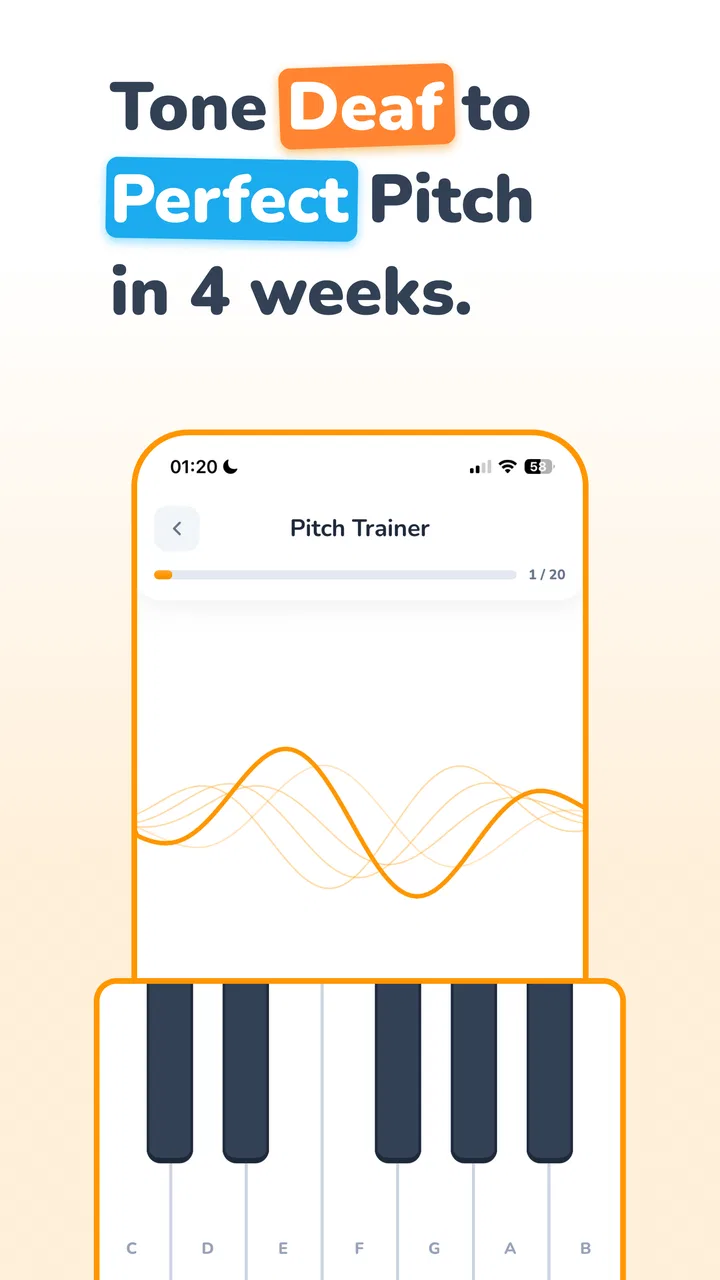
Pitch Trainer - Ear Training is the kind of education app I would open with a very specific goal: stop guessing at notes and start recognizing what I am hearing. Rather than treating ear training as a vague musical skill, it gives the subject a focused place on my phone, covering notes, intervals, chords, scales, and progressions. That makes it useful for a musician who wants short, repeatable practice away from an instrument, although it is not a replacement for playing, singing, or learning music in context.
I approached it as a practical tool rather than a game I would use casually for a few minutes and forget. The developer is Ear & Pitch Training Studios LLC, and the app sits in the Education category. It is free to install, with optional purchases ranging from $4.99 to $59.99 per item. That combination makes it easy to try before spending anything, but it also means I would first work through the accessible material and decide whether the training style suits me before considering an upgrade.
Getting past the first points of friction
The first challenge with any ear-training app is not usually the sound itself. It is understanding what the exercise expects me to do. A note exercise may ask me to identify a pitch, while an interval exercise asks me to judge the distance between two notes. Chords and progressions require a different kind of attention again. If I answer too quickly without knowing the task, a wrong result can feel like a hearing problem when it is really a reading problem.
You May Also Like

 Blood Strike: 2.5 Anniversary
Blood Strike’s Loadouts Turn Every Drop Into a Tactical Gamble
A close look at Blood Strike’s custom loadouts: how fast access to signature weapons reshapes its battle royale rhythm, rewards preparation, and narrows the gap between fights.

 Pandora - Music & Podcasts
Pandora’s Music Is Easy to Start, but Harder to Recover
Pandora’s strength is its low-effort path from a seed to a station. Its weak spot is how much confidence it asks you to place in connection, setup, and quiet recovery.

 8 Ball Pool
 Is Built on Rivalries, Rematches, and Routine
A close look at the rivalries, rematches, shared routines, and unanswered safety questions that turn a quick pool match into a persistent mobile community.

 Samsung Music
’s Quiet Strength Is Playing What You Already Own
Its reach comes less from spectacle than from dependable access to a personal library. That simplicity is both the app’s strongest retention engine and its ceiling.

 AccuWeather: Weather Radar
AccuWeather Review: A Quick, Clear Forecast for Everyday Decisions
For everyday plans, the best forecast is the one you can understand quickly. AccuWeather makes rain timing, radar, and local conditions easy to act on, with a few trade-offs.

 Hill Climb Racing
Why Hill Climb Racing Still Turns Crashes Into One More Run
A tiny car, a bumpy hill and one more upgrade: Hill Climb Racing keeps resurfacing because its simple chaos makes every near-miss feel personal.
More From Our News Desk
View All News


My best advice is to begin with one subject at a time. I would not jump between notes, intervals, chords, scales, and progressions in the same sitting just because all of them are available. Each area uses a different mental reference. Staying with one type of question lets me notice whether I am struggling with the musical idea or simply switching gears too often.
The app’s short description, “Pitch Trainer,” can make it sound narrower than it really is. In practice, the broader value comes from using pitch recognition as a foundation and then applying that attention to relationships between sounds. Beginners may find the early work more approachable when they listen carefully before trying to build speed. More experienced musicians can use the same structure to expose a weak area, especially if they have always relied on visual aids or an instrument.
A realistic everyday use case is a ten-minute session before rehearsal. I might identify a few notes, spend a little longer on intervals, and stop before fatigue turns every answer into a guess. That is more useful than forcing a long session while commuting or multitasking. Ear training depends on attention, and background noise, conversation, or low phone volume can make the results misleading.
What to check before blaming the exercise
When an answer seems unexpectedly difficult, I first check the basic listening conditions. I use headphones when possible, keep the volume comfortable, and make sure another audio source is not playing at the same time. A phone speaker can be enough for some practice, but it may make low notes, chord color, or closely spaced pitches harder to distinguish. Increasing volume is not always the answer; clarity matters more than loudness.
I also check whether I am physically ready to listen. Ear training after a noisy trip, a long rehearsal, or several hours of music can feel much harder than the same exercise earlier in the day. If the app suddenly seems inconsistent, I repeat a small number of questions in a quiet setting instead of immediately deciding that the exercise is faulty.
Device preparation matters too. I make sure the operating system meets the app’s minimum requirement, which is Android 7.0 or later, and I keep the app updated to its current version, 6.3.3. Those are simple checks, but they remove avoidable compatibility questions before I spend time diagnosing a lesson or practice session.
Another useful check is my answer method. I try to listen to the entire prompt before tapping. In interval work, the first note can become an anchor, but rushing to name it may distract me from hearing the relationship to the second note. With chords and progressions, I listen for overall movement and character before trying to label every detail. This is a small habit, yet it changes the app from a reaction test into actual listening practice.
Recovering when progress feels stuck
One of the most common mistakes I make with ear training is treating every incorrect answer as a signal to increase difficulty. That usually creates frustration rather than improvement. If I miss several questions in a row, I step back to a simpler subject or repeat the same type of exercise more slowly. The aim is not to protect my score; it is to rebuild a dependable reference.
I find it helpful to keep a mental note of the mistake category. Am I confusing neighboring notes, mixing up ascending and descending movement, or hearing a chord as a collection of individual pitches instead of one sound? These are different problems. Repeating everything at random hides the pattern, while focusing on the recurring confusion gives the next session a purpose.
A practical recovery workflow is to use the app in three stages. First, I listen without trying to answer instantly. Second, I make a deliberate choice and notice why it feels right or wrong. Third, I pause after a mistake and replay the sound mentally before moving on. That last step is important because immediately tapping through the next question can turn practice into button pressing.
I also avoid changing several variables at once. If I am learning intervals, I keep the same exercise type while I work on recognition. If I change the subject, pace, and listening equipment together, I cannot tell what helped. This is one of the less obvious benefits of a focused app: it gives me a controlled place to isolate one listening skill, provided I use it systematically.
There is a trade-off here. A phone app makes repetition convenient, but convenience can encourage shallow practice. I can complete many prompts without remembering the sound afterward. To counter that, I occasionally sing or play the answer on an instrument after the exercise, if I have one nearby. The app provides the listening prompt, while my voice or instrument connects recognition to a physical musical action.
When the problem is outside the app
Not every disappointing session points to a software issue. Pitch recognition is affected by fatigue, concentration, room noise, and expectations. If I am trying to train while reading messages or walking beside traffic, I am testing my environment as much as my ears. A wrong answer in those conditions tells me very little about my actual ability.
Instrument tuning can also confuse the experience. If I use a guitar, keyboard, or another reference instrument before opening the app, I want that instrument to be reasonably in tune. Otherwise, I may build a comparison against a reference that is already off. This matters especially when moving from note identification to intervals, because an inaccurate starting point can make a correct relationship feel unfamiliar.
My hearing context is another consideration. If sounds seem muffled, unbalanced between ears, or unusually uncomfortable, I would stop rather than compensate by turning the volume higher. The app is not a hearing test, and persistent listening difficulties deserve attention outside a practice session. That is a sensible boundary for any ear-training tool.
There is also a difference between recognizing a sound in isolation and using it in real music. Pitch Trainer - Ear Training can help me focus on individual musical elements, but it cannot by itself teach phrasing, rhythm, tone production, ensemble balance, or the expressive decisions that make a performance convincing. I would pair it with songs, instrument practice, singing, and lessons rather than expecting it to cover the entire musicianship journey.
How it compares with familiar alternatives
The usual alternative is a teacher, a method book, or a musician’s instrument. A teacher can hear the kind of mistake I am making and adapt the exercise immediately. A book can explain theory more deeply. An instrument lets me connect a sound to finger placement, breath, or vocal control. This app is less personal than a teacher and less complete than a full course, but it is much easier to use for a brief, repeatable listening session.
Compared with random online exercises, a dedicated app feels more practical because I can keep my attention on the task instead of searching for the next example. The focused format is especially useful when I know I need work on intervals or chord recognition but do not want to assemble a practice routine from scattered videos. The limitation is that a fixed digital exercise cannot always explain why my answer was wrong in the way a human instructor can.
I would choose a traditional lesson first if I had no musical foundation and felt lost about basic terminology. I would also favor instrument-led practice if my main goal were to improve sight-reading, accompaniment, or performance. Pitch Trainer - Ear Training makes the most sense as a supplement: a compact listening laboratory that fills the gaps between lessons and rehearsals.
The app has a 4.7 average from around 3.6 thousand ratings, and it has passed 50 thousand installs. Those figures suggest that the concept has found a real audience, but they do not decide whether it fits my learning style. The important question is whether I will use focused listening regularly. An unused training app, however polished, cannot improve my ear from the home screen.
Who should try it and who should skip it
I would recommend it to beginners who want a clear starting point, singers who want stronger pitch awareness, instrumentalists who depend too heavily on visual guidance, and theory students who need more contact with actual sound. It can also suit a musician preparing for an audition or rehearsal who wants to identify a particular weak area without carrying a book or instrument everywhere.
I would be more cautious if I wanted a complete, teacher-like curriculum with detailed explanations after every mistake. I would also skip it as my main tool if I dislike repetition or expect immediate improvement from occasional tapping. Ear training rewards consistency, and the app cannot remove that work. The free entry point is helpful, but I would pay attention to which material is available without purchasing and whether the unlocked scope matches my goals before spending more.
The Everyone content rating makes it suitable for a broad audience, including younger learners who are ready to work independently with musical sounds. For children, I would still guide the practice at first, not because the exercises are inherently complicated, but because a child may need help understanding the difference between guessing and listening for a reason.
My practical verdict after using it as a training tool
What I like most is the app’s narrow purpose. It encourages me to treat listening as a trainable skill instead of something that will automatically improve just because I play an instrument. The coverage of notes, intervals, chords, scales, and progressions gives me room to move from basic recognition toward more musical relationships, while the phone format makes short sessions realistic.
What I like less is the possibility of turning the experience into a score chase. Fast answers can look like progress even when I am relying on memory, position, or luck. I get better results when I slow down, use quiet headphones, keep one subject in focus, and connect difficult examples to singing or playing afterward. That workflow requires discipline, but it also makes the app more valuable than a casual quiz.
My final recommendation is to install it if you want a convenient companion for deliberate ear practice and are willing to build a routine around it. Start with the free experience, test it in a quiet environment, and judge it by whether you can recognize sounds more confidently outside the app. The strongest use of Pitch Trainer - Ear Training is not replacing a musician’s education; it is giving daily listening practice a dependable place to happen.
FAQs for Pitch Trainer - Ear Training
01What is Pitch Trainer - Ear Training used for?
Pitch Trainer - Ear Training is designed to help musicians, singers, and beginners improve their ability to recognize musical pitches by ear. The app presents listening exercises that require you to identify notes, intervals, or pitch differences, depending on the selected training mode. It can be useful for developing intonation, ear-training skills, sight-singing preparation, and general musical awareness through short, repeatable practice sessions.
02Is Pitch Trainer - Ear Training suitable for complete beginners?
Yes, the app can be useful for beginners, although some basic understanding of musical notes may make the exercises easier to follow. New users can start with simpler pitch-recognition activities and gradually increase the difficulty as their accuracy improves. It is also suitable for more experienced singers and instrumentalists who want focused ear practice, but consistent repetition is important because progress depends on regular listening rather than occasional use.
03Can Pitch Trainer - Ear Training help improve singing accuracy?
It may help improve singing accuracy by training you to hear differences between pitches and recognize whether a note is higher or lower than another. However, the app does not replace vocal coaching, breathing practice, or feedback from a teacher. To get better results, you can combine the exercises with singing the notes aloud, checking your intonation on an instrument, and practicing slowly before attempting more difficult pitch challenges.
04Does Pitch Trainer - Ear Training require an internet connection?
The basic training experience may work without a continuous internet connection, which is convenient for practicing while traveling or in places with limited connectivity. Nevertheless, some app functions can depend on the version installed, such as advertisements, analytics, updates, account-related features, or additional content. It is recommended to open the app once while online and review its current permissions and feature descriptions before relying on it for offline practice.
05Is Pitch Trainer - Ear Training free to download and use?
The app may be available to download at no initial cost, but the exact pricing model can vary depending on the platform, region, and current version. Some features may be supported by advertising or offered through optional in-app purchases. Before downloading, check the Google Play Store or Apple App Store listing for subscription details, premium exercises, and any limitations in the free version so there are no surprises.
Pros
- Short daily exercises make ear training easy to fit into a routine.
- Covers pitch recognition skills useful for singers and musicians.
- Immediate feedback helps identify mistakes while practicing.
- Simple interface keeps sessions focused and distraction-free.
- Works well for beginners building confidence with musical intervals.
Cons
- Some exercises may feel repetitive after extended use.
- Advanced musicians may find the training options too limited.
- Progress tracking could offer more detailed performance statistics.
- Requires consistent practice to produce noticeable improvement.
- Certain lessons may be difficult without basic music theory knowledge.

Pitch Trainer - Ear Training
Gallery